Good contractor website design does one job: it turns a stranger who searched “roofer near me” or “general contractor in Danville” into a phone call or an estimate request. That takes four things. Show your finished work, make it obvious where you work and what you build, put a way to call or request a bid on every screen, and give Google and AI tools enough clear information to recommend you.
Most contractor sites miss at least one of those. The work is great, but the site hides it behind a slow gallery, or the phone number is buried in the footer, or the site never says which towns the crew actually covers. Below is what a contractor site needs in 2026, the pages to build, how homeowners and project owners now use Google and AI to shortlist contractors, and the process we use when we build sites for builders, landscapers, and construction firms from our office in Lexington, Kentucky.
Table of Contents
What Makes Contractor Website Design Different?
A contractor’s website sells something the buyer can’t hold before they pay for it. A homeowner hiring a roofer or a facilities manager hiring a general contractor is trusting you with a big check, their property, and often their schedule. They want proof before they pick up the phone.
Three things set contractor website design apart from a typical small business site:
- The work is the product. Photos of finished jobs do more selling than any paragraph you’ll write. A site with strong project photos and a weak headline will beat a site with a clever headline and stock images.
- Location is everything. Contractors serve an area, and buyers search by town. If your site doesn’t say where you work, Google and AI tools have to guess.
- The buyer is on a phone, often outside. People look up contractors from the driveway, the job site, or the truck. If your site is slow or hard to tap through on a phone, they call the next name.
There’s a fourth difference for many trades: you’re hiring as much as you’re selling. Your website is also where skilled workers decide whether to apply.
What Should a Contractor Website Include? 11 Essentials
Use this as a contractor website design checklist for a new build or a redesign. If your site misses more than three, it’s probably costing you bids.
| # | Essential | Why it matters |
|---|---|---|
| 1 | Click-to-call phone number and “request an estimate” on every page | Buyers act fast or move on |
| 2 | A project gallery with real photos, organized by type of work | Proof beats promises |
| 3 | One page per service, in the words customers search | Matches how people and AI tools find you |
| 4 | Clear service area: the towns and counties you cover | Feeds local search and stops wrong-area calls |
| 5 | Licenses, insurance, bonding, and certifications in plain text | Commercial buyers and careful homeowners check |
| 6 | Reviews and testimonials, with the reviewer’s town and project type | Social proof that matches the reader’s situation |
| 7 | A short estimate form (five fields or fewer) | Long forms lose leads |
| 8 | Fast, mobile-first pages | Many first visits happen on a phone |
| 9 | An About page with your team, your years in business, and real photos | People hire people |
| 10 | A careers page with always-open roles | Recruiting is a constant need for most crews |
| 11 | A Google Business Profile that matches the site | Drives the map pack and AI answers |
The sections below cover the essentials that make the biggest difference.
How Do You Show Your Work on a Contractor Website?
Your project gallery is the heart of your contractor website design. Treat it that way.
Organize projects the way buyers think
A homeowner looking for a deck builder doesn’t want to scroll past forty kitchen remodels. Group projects by type of work (decks, additions, roofs, commercial build-outs) so each visitor lands on work like theirs. For larger firms, a project page for each major job works even better: a few photos, the location, the scope, the timeline, and one sentence on the problem you solved.
Each project page also gives search engines and AI tools something specific to read. “Two-story addition with a timber-frame porch in Harrodsburg, Kentucky” says a lot more than a photo with no caption.
Invest in photos and video
On one construction site we launched, the client and our team kept coming back to the same point: the quality of the photography and video would decide how the company came across. Phone photos can work if they’re sharp, well lit, and taken when the job is clean. For your best projects, pay for a photographer or a drone pilot. You’ll use those images for years on the site, your Google Business Profile, proposals, and social media.
A few practical rules:
- Shoot before, during, and after. Progress photos show how you work, and buyers want to see that too.
- Get the client’s OK before you post photos of their home or business, and leave out house numbers.
- Compress images before upload so the gallery stays fast on a phone.
- Write alt text that describes what’s in the photo, like “Finished stone patio with a fire pit behind a brick ranch home.” A file name like “IMG_4471” tells Google and screen readers nothing.
Use the proof you have
Years in business, licenses, insurance, bonding capacity, safety records, manufacturer certifications, and association memberships all count. Put them in plain text on the About page and near your estimate form. A commercial buyer checking whether you can handle a project often looks for these before anything else.
If you list partners, suppliers, or associations, ask before you use their logos. A link back to your site from a supplier or trade association is also worth asking for. Those links help your search rankings, and they’re links your competitors can’t easily copy.

How Do Contractors Get Leads From Their Website?
A pretty site that doesn’t produce calls is an expense. The goal of contractor website design is to make the next step obvious on every page.
Put the call and the estimate button everywhere
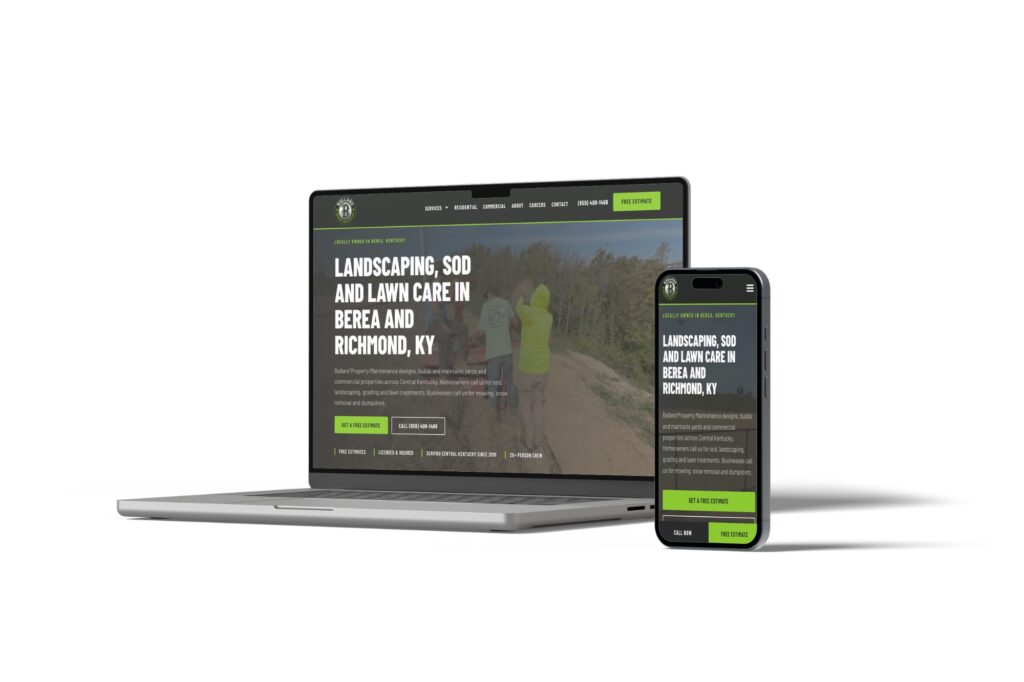
Your phone number should be at the top of every page and tappable on a phone. Add a “Request an Estimate” or “Get a Free Quote” button next to it. When we built a site for Ballard Property Maintenance, a Berea landscaping crew that had no website before, we pinned a call and free-estimate bar to the bottom of the screen on phones so it’s always one tap away.
Keep the estimate form short
Ask for what you need to call back and nothing more: name, phone, email, town or ZIP, and a short description of the project. Add an optional photo upload if your trade benefits from it (roofing, concrete repair, landscaping). Every extra required field costs you leads.
Then make sure someone actually gets the submission. It sounds obvious, but forms break, and notification emails go to people who’ve left the company. Test your form once a month. On sites we host, we check forms as part of regular maintenance.
Split residential and commercial paths
If you do both, give each its own path. A homeowner and a property manager care about different things. The Ballard site gives residential and commercial services separate paths so each buyer sees the work and language that fits them. Looking as established online as you are on the job matters most when you’re bidding commercial work.
Answer the questions you hear on every call
Do you offer free estimates? How soon can you start? Do you handle permits? Are you insured? What areas do you serve? Put those answers on your service pages and in an FAQ. You’ll get better-qualified calls, and you’ll give AI tools clear answers to repeat.
What Pages Should a Contractor Website Have?
A typical contractor website design includes these pages:
- Home. What you build, where you work, proof, and a clear way to call or request an estimate.
- Services. One page per service. “Roof replacement,” “storm damage repair,” and “gutter installation” each deserve their own page.
- Projects or gallery. Organized by type of work, with a page for each major project if you can.
- Service area. The towns and counties you cover. Larger firms can add a page for each main market, but only if each page says something specific about the work there.
- About. Your story, your team, years in business, licenses, insurance, and certifications.
- Reviews. Testimonials and a link to your Google reviews.
- Careers. Open roles and an application form.
- Contact and estimate request.
- FAQ. The questions you hear every week.
Contractors who sell to other contractors need a slightly different shape. One landscape company we spoke with wanted a login-protected inventory page so other contractors could check what’s in stock and what it costs from their phones, instead of calling around. If your buyers are trade professionals, think about what they need at 6 a.m. on a job site, and put that first.
Why Should Your Website Help You Hire?
Ask most contractors what keeps them up at night and finding good people is near the top of the list. Your website can help, and it’s the part of contractor website design that gets skipped most often.
On a site we launched for a general contractor, we set up job listings that stay up all the time for the roles the company is always hiring (concrete labor, site superintendents, equipment operators), plus an open application for people whose role isn’t listed. Later we ran Google Ads pointing to the concrete labor posting. In the first few weeks, the website brought in more applications than it had in the previous several months.
A careers page that works has:
- Each open role on its own page or section, with pay range if you’re comfortable sharing it, schedule, and what a typical day looks like.
- A short application form that works on a phone. Many applicants will never touch a laptop.
- Photos of your actual crews and equipment.
- Benefits listed plainly.
- A notification that goes to the person who actually does the hiring. Check it whenever that person changes.
How Does Local Search Work for Contractors?
Google is still where many buyers start, and many contractor searches are local: “concrete contractor Lexington KY,” “roofer near me,” “general contractor Danville.” The map pack at the top of those results is where many calls come from.
Set up your Google Business Profile correctly
Most contractors are what Google calls service-area businesses: you go to the customer instead of the customer coming to you. Google’s help page on managing service areas says that if you don’t serve customers at your business address, you should remove the address from your profile. You can list up to 20 service areas by city or ZIP code, and Google says the overall area shouldn’t be more than about two hours of driving time from where you’re based. Follow Google’s guidelines for representing your business on your name and categories too.
Check that you actually control your profile. A general contractor we work with found its Google listing showed “5+ years in business” for a company that has been around for about 40 years. The first step was getting full ownership of the profile so the team could fix the details and replace the outdated photo. If you don’t know who has the login to yours, find out this week.
Use the words your buyers use
Good contractor website design starts with the words buyers type. That same client noticed something useful. Many people search for “construction companies” in their town, while buyers who know the industry search for “general contractor.” Your service pages should use both. Write the way your customers talk, then add the trade terms your more experienced buyers use.
Ask for reviews after every job
Reviews drive the map pack and help AI tools decide who to recommend. Ask every happy customer, make it easy with a direct link, and reply to every review, good or bad, like a professional.
Consider Local Services Ads
For many trades, including general contractors, roofers, electricians, plumbers, and landscapers, Google offers Local Services Ads. Google shows them prominently in search results, can display a Google Verified badge once your business passes its screening, and charges only for leads related to the services you offer. Whether they’re worth it depends on your trade and market, so test them and track the leads.
Our local SEO playbook for small businesses walks through every step, and it applies directly to contractors.
How Do Buyers Use AI Tools to Shortlist Contractors?
This changed fast. BrightLocal’s 2026 Local Consumer Review Survey found that use of ChatGPT and other AI tools for local business recommendations jumped from 6% to 45% in a year. In a 2026 homeowner survey reported by ACHR News, 37% of homeowners said they’d look for reviews of HVAC contractors through AI tools like ChatGPT. Google Business Profiles (54%) and contractor websites (45%) still led the list.
So the website still matters. AI tools just add a step. When someone asks ChatGPT or Google’s AI Overviews for “a reliable roofer in Lexington who handles insurance claims,” the tool writes an answer and names a few companies. It pulls those names from sources it can read and trust. Here’s what helps you get named:
- Plain statements of what you do and where. “We replace and repair residential roofs in Fayette, Jessamine, and Scott counties” is easy for an AI tool to repeat. A slogan isn’t.
- A page for each service. A single “Services” page with a bulleted list gives AI tools very little to work with.
- Project pages with locations. They show you’ve actually done this work in this place.
- A consistent reputation off your site. Your Google Business Profile, reviews, directory listings, and association memberships should all match your website.
- Structured data. Google supports LocalBusiness structured data, code that labels your business name, address, phone, and hours so machines read them correctly. Your web team can add it.
- Access for AI crawlers. Some security settings block AI crawlers by default. Check that the ones you want can reach your public pages.
We cover the full process in our guide on how to rank in AI Overviews and get into ChatGPT. For contractors, the short version is this: the same specific, proof-heavy content that convinces a homeowner also helps an AI tool recommend you. Nobody can guarantee an AI tool will name you, but vague sites rarely get named.

How Much Does a Contractor Website Cost?
The cost of contractor website design depends on what the site has to do. Our published numbers: a new small business site averages around $3,500 to build, a redesign runs $2,500 to $8,000 depending on what you need the website to do for you, and our care plans for hosting and maintenance average $150 to $750 a month. For ongoing local SEO, $400 to $500 a month is a good starting point.
What pushes the price up for contractors: a large project gallery with many project pages, online booking or scheduling, a login area for trade customers, multiple locations, or integrations with estimating or CRM software. What keeps it down: having your photos, licenses, service list, and service area ready before the project starts.
Be wary of a site that’s very cheap and very fast. A $500 template site with stock photos and no service pages won’t win many bids, and it can take longer to fix than to replace.
How We Approach Contractor Website Design
Here’s the process we use with contractors. Borrow any of it.
Start with how you win work. We ask what kinds of jobs you want more of, where you want them, who usually makes the hiring decision, and how leads come in today. A crew that wants more commercial work needs a different site than one that wants more residential remodels.
See a prototype first. We design your homepage, a services page, and your contact page before the full build. You approve the direction before we build the rest.
Gather the proof. Project photos, licenses, certifications, years in business, reviews, and the questions you answer on every call. This is usually the step that decides the timeline, so we start it on day one.
Build and launch in phases. A site with online booking and payments typically launches about six weeks after kickoff. Larger builds can take four to six months. You can watch the site come together the whole time.
Host, maintain, and measure. After launch we host and maintain the site, test the forms, and report on what matters: calls, estimate requests, applications, and where they came from. Every build includes on-page SEO basics: page speed, image sizes, page titles, and meta descriptions. Ongoing SEO and Google Ads are separate monthly services. See our WordPress web design page for more.
One Thing You Can Do This Week
Pull up your website on your phone and pretend you’re a homeowner in a town you serve. It’s the quickest contractor website design audit there is.
- Time how long it takes to find your phone number and a way to request an estimate. More than five seconds is too long.
- Check whether the site says, in plain words, which towns or counties you cover.
- Find photos of a project like the one you’d want to hire for. Count the taps.
- Submit your own estimate form and see who receives it, and how fast.
- Search your company name on Google and confirm you can log in to your Google Business Profile.
Fix what you find in the first four before you worry about anything fancier.
What should a contractor website include?
At minimum: a click-to-call phone number and estimate request on every page, a project gallery with real photos, one page per service, a clear list of the towns or counties you serve, licenses and insurance in plain text, reviews, a short estimate form, an About page with your team, and a careers page. Make sure your Google Business Profile matches the site.
How much does a contractor website cost?
Our published pricing: a new small business site averages around $3,500, a redesign runs $2,500 to $8,000 depending on what the site needs to do, and hosting and care plans average $150 to $750 a month. Large project galleries, trade-customer logins, booking, and software integrations push the price higher.
Do contractors need a website if they get most work from referrals?
Yes. Referred customers almost always look you up before they call. If they can’t find a site, or the site looks outdated, some will call the other contractor they were told about. Your website confirms the referral and helps the people who don’t have one find you.
How do contractors get more leads from their website?
Put a tappable phone number and an estimate button on every page, keep the estimate form to five fields or fewer, give each service its own page, show real project photos by type of work, list your service area, and ask every happy customer for a Google review. Then test your form every month to make sure leads reach the right person.
How long does it take to build a contractor website?
A site with online booking and payments typically launches about six weeks after kickoff at our shop. Larger builds with many project pages, multiple locations, or integrations can take four to six months. Having photos, licenses, and your service list ready early is the biggest factor in staying on schedule.
Get a Second Opinion on Your Contractor Website
Contractor website design comes down to this: show the work, say where you do it, make it easy to call, and give Google and AI tools clear facts to work with. Most contractors are a few fixes away from a site that brings in more bids.
If you want a second set of eyes, request a free website and conversion review. We’ll look at how a homeowner or project owner moves through your site, check your forms and your Google Business Profile, and show you what to fix first. Request your website review or call us at (859) 951-8412.