Good healthcare website design does three jobs: it helps a worried person find the right care fast, it protects their privacy, and it gives them enough reason to trust you before they ever call. If your site makes patients hunt for a phone number, sends their information through a form that wasn’t built for health data, or locks out people who use screen readers, it’s costing you patients and adding risk.
Below is what a healthcare site has to do in 2026, the privacy and accessibility rules worth knowing, how patients now use AI tools to pick a provider, and the process we use when we build sites for clinics, therapy providers, and health organizations from our office in Lexington, Kentucky. It applies whether you run a single practice, a multi-location group, a county health department, or a company that sells services to hospitals.
This isn’t legal advice. HIPAA and accessibility law have real consequences, so run the specifics past your compliance officer or attorney. What follows is how those rules show up in the actual website work.
Table of Contents
What Makes Healthcare Website Design Different?
Most business websites sell to someone who is shopping. A healthcare website often serves someone who is scared, in pain, or caring for a person who is. That changes almost every design decision.
Four things set healthcare apart:
- The visitor’s state of mind. A parent looking for a pediatric therapist at 10 p.m. doesn’t want to read your mission statement. They want to know if you treat their child’s condition, whether you take their insurance, and how to get started.
- The data. The moment a form asks about symptoms, diagnoses, or insurance, you may be handling protected health information. That puts real limits on which form tools, analytics, and ad pixels you can use.
- The rules on what you can say and show. Many healthcare organizations work under ethics codes or policies that restrict testimonials, patient photos, and outcome claims. Your design has to build trust without the tools most businesses lean on.
- The audience mix. Patients, families, referring doctors, insurers, job applicants, and sometimes hospitals all land on the same site. Each needs a clear path.
Get those right and the rest of healthcare website design is familiar ground: a fast site, clear pages, strong local search, and a simple way to take the next step.
What Does a Healthcare Website Need? 12 Essentials
Use this as a healthcare website design checklist for a new build or a redesign. If your current site misses more than three or four, it’s time to plan changes.
| # | Essential | Why it matters |
|---|---|---|
| 1 | Phone number and “request an appointment” on every page | Patients act fast or leave |
| 2 | One page per service or condition, in patients’ words | Matches how people search and how AI tools answer |
| 3 | Insurance and payment information that’s easy to find | One of the first questions every new patient asks |
| 4 | Location pages with hours, parking, and directions | Essential for multi-location groups and local search |
| 5 | Provider bios with credentials and real photos | Trust starts with knowing who will treat you |
| 6 | Privacy-safe forms for anything health-related | Standard form plugins aren’t built for health data |
| 7 | Analytics and ad tracking set up with privacy in mind | Tracking pixels on the wrong pages create risk |
| 8 | Accessibility to WCAG 2.1 AA | Required for many providers and right for every patient |
| 9 | Mobile-first, fast pages | Many patients find you on a phone |
| 10 | Clear new-patient path (what to expect, what to bring) | Reduces no-shows and phone volume |
| 11 | A careers section | Hiring clinicians is a constant need for most practices |
| 12 | Google Business Profile and listings that match the site | Feeds the map pack and AI answers |
The sections below cover the essentials that cause the most trouble.
How Do You Build Patient Trust on a Healthcare Website?
Trust is the whole game in healthcare website design. People are deciding who gets to treat their body, their parent, or their child.
Lead with reassurance, then get practical
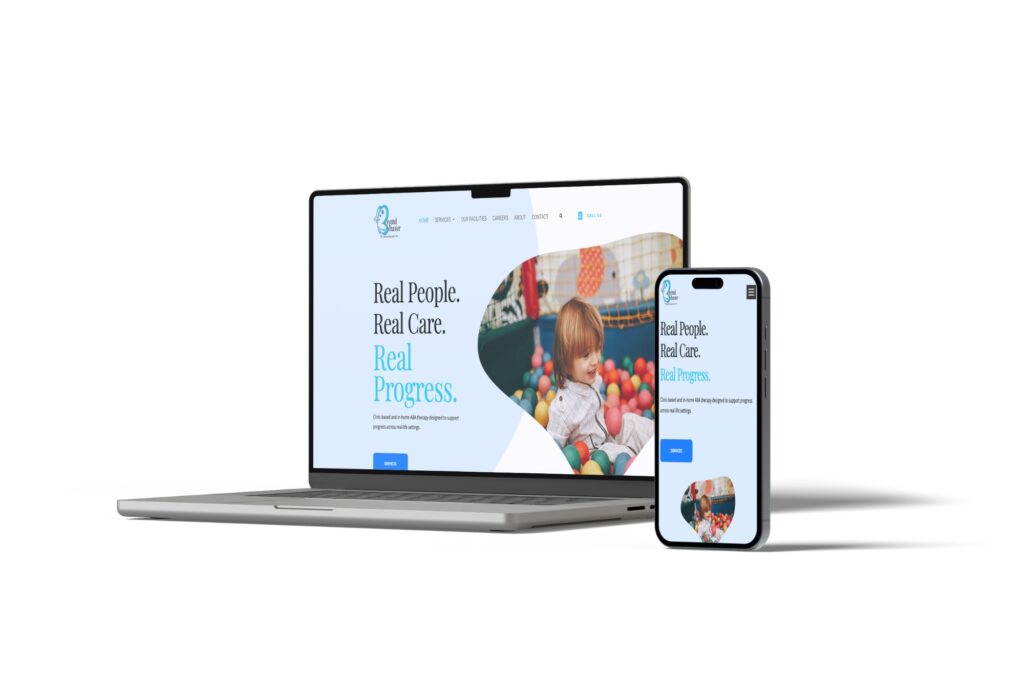
When we built a site for a multi-location ABA therapy provider that had never had a website, the brief was simple: reassure parents first, then get practical with services, facilities, and careers for therapists. The homepage speaks to what the parent is feeling. The next click answers what they need to know.
That order works for almost any practice. Open with a plain sentence about who you help and how. Follow it with the three or four things a new patient needs: services, insurance, locations, and how to start.
Show your people
Real photos of your providers and your space beat stock photos every time. Patients want to see the waiting room they’ll sit in and the face of the person they’ll talk to. Give each provider a short bio with credentials, specialties, and one human detail. If a provider speaks a second language, say so.
Work around testimonial and photo limits
Here’s a problem most web designers never run into. One provider we worked with operates under an ethics code that bars them from asking for testimonials and from posting any photos of the people they serve. Testimonials offered on their own have to be posted anonymously.
So we planned for it from the prototype. We gave unsolicited, anonymous testimonials a prominent spot in the layout, suggested non-identifying photos (the back of someone’s head, hands at work on an activity) with permission, and built a shot list for staged photos. We also recommended the client confirm staged-photo use with their ethics office before launch.
If your organization has similar rules, tell your web team on day one. It shapes the layout, the photography budget, and the content plan.
Use the proof you’re allowed to use
Recognitions, accreditations, and quality grades are trust signals patients can verify. A hospital or clinic with a strong safety grade or an accreditation should give each one its own section in plain text, with a link to the source. That helps patients, and it gives search engines and AI tools something specific to index. Years in practice, number of locations, and the conditions you treat most often all count too.
How Should Healthcare Websites Handle HIPAA?
This is where healthcare website design gets technical, and where a lot of practices are exposed without knowing it.
Contact forms and intake forms
Most WordPress sites use a form plugin that emails submissions and stores them in the site’s database. That’s fine for “Call me about a consultation.” It’s a problem for a form that asks for a diagnosis, symptoms, insurance ID, or uploaded records.
When a provider we work with wanted to move new-patient intake paperwork online, the first question was where that data would live. Our approach:
- Split the forms. A general contact form can stay simple. Anything that collects health information goes through a service built for it.
- Use a HIPAA-capable form service that will sign a business associate agreement (BAA) with you. Several online form services offer this on specific plans. Confirm the BAA before any patient data goes in.
- Keep health data out of email. Set the form to notify staff that a submission arrived, then have them log in to the secure service to read it.
- Plan for uploads and scheduling too. File uploads and tour or appointment scheduling need the same treatment.
Chad’s rule from that project: raise HIPAA at the very first meeting, before anyone picks a form tool. Retrofitting compliance after the site is built costs more and delays launch.
Analytics and tracking pixels
Google is direct about this. Its help page on HIPAA and Google Analytics says Google makes no representation that Analytics satisfies HIPAA, doesn’t offer business associate agreements for it, and that HIPAA-regulated entities must not expose protected health information to Google.
In practice, that means:
- Don’t put analytics or ad pixels on patient portals, intake forms, or appointment confirmation pages.
- Don’t send form field contents, condition names, or anything identifying to analytics as event data.
- Review every third-party script on the site at least once a year. Chat widgets, heatmaps, and social pixels all count.
The federal rules on tracking have shifted. In 2024, a federal court in Texas vacated part of the Department of Health and Human Services’ guidance on tracking technologies, and HHS dropped its appeal, according to the American Hospital Association. That narrowed the guidance for public pages. It didn’t change the rules for pages where patients log in, book, or share health details. When in doubt, leave tracking off the sensitive pages and ask your compliance officer.
Hosting and security basics
A healthcare site needs the same security every business site should have, done consistently: an SSL certificate, a firewall, current software, and backups you can restore. On sites we host, that means Cloudflare, nightly backups plus a backup before every update, and staging sites for testing changes before they go live. If your site stores patient data directly (most shouldn’t), the hosting arrangement itself needs a BAA and a security review.
Does a Healthcare Website Have to Be Accessible?
For many providers, yes, and for every practice it’s the right call. Patients with low vision, hearing loss, or limited mobility need to book appointments and read instructions too.
The standard to build to is the Web Content Accessibility Guidelines, published by the W3C. WCAG 2 covers things like text contrast, keyboard navigation, alt text on images, captions on video, form labels, and pages that work with screen readers.
Organizations that receive federal health funding, which includes many that accept Medicare or Medicaid, fall under a Section 504 rule from HHS that adopts WCAG 2.1 Level AA as the technical standard for websites and apps. HHS extended the compliance dates by a year in 2026, according to the law firm Feldesman. The requirement itself still stands. Ask your compliance officer which date applies to your organization.
What accessible healthcare website design looks like in practice:
- Text that’s readable at a glance, with strong contrast and a comfortable size.
- Every image described with real alt text. “Dr. Patel talking with a patient in an exam room” helps. “image1.jpg” doesn’t.
- Forms with clear labels and error messages a screen reader can announce.
- PDFs replaced with web pages where possible. A scanned intake form is unusable for a blind patient.
- Video with captions.
- Everything usable with a keyboard alone.
Accessibility overlays (the widgets that promise one-line compliance) don’t fix the underlying code. Build it right, then test with real tools and real users.
How Do Patients Use AI Tools to Find Healthcare Providers?
This part changed fast. About one in three US adults used AI chatbots for health information in the past year, according to a KFF poll from March 2026. Many of those questions end with “Who treats this near me?”
When someone asks ChatGPT, Google’s AI Overviews, or Perplexity for a pediatric occupational therapist in Lexington or a sleep clinic that takes their insurance, the tool writes an answer and names a few providers. It pulls those names from sites and sources it can read and trust. Here’s what helps you get named:
- Plain statements of what you treat and where. “We provide clinic-based and in-home ABA therapy for children in Central Kentucky” is easy for an AI tool to repeat. A slogan isn’t.
- Depth on each service. On one healthcare client’s site, Chad pushed to grow key service pages from about 300 words to about 1,200 by answering three questions: What is this service? Why does a hospital care? Why does a patient care? Thin pages give search engines and AI tools very little to work with.
- A consistent reputation off your site. Reviews, your Google Business Profile, directory listings, and insurer directories should all match your website. AI tools cross-check.
- Access for AI crawlers. Some security settings block AI crawlers by default. Check that the ones you want can reach your public pages.
We cover the full process in our guide on how to rank in AI Overviews and get into ChatGPT. For healthcare, the short version is this: the same clear, specific content that helps a worried patient also helps an AI tool recommend you.

How Does Local Search Work for Healthcare Practices?
Google is still where many patients start, and many healthcare searches are local: “urgent care near me,” “pediatric dentist Lexington,” “OB near me.” The map pack at the top of those results is prime real estate.
Three things drive it:
- Your Google Business Profile. Accurate name, address, phone, hours, categories, and photos for every location. Follow Google’s guidelines for representing your business, especially for practices with several providers at one address.
- Location and service pages on your site. Each location gets its own page with hours, parking, directions, services offered there, and providers who work there.
- Reviews. Patients read them closely. Respond to reviews without confirming that the reviewer is a patient or discussing their care, since even a reply can disclose health information.
Our local SEO playbook for small businesses walks through each step. It applies directly to clinics and practices.
A note on paid search: healthcare keywords can be expensive, and large health systems often bid on them every month. Chad’s view from a call with a community health center: if one new patient covers a month of ad spend, the math works. Track it closely and keep landing pages free of ad pixels on any page that collects health details.
What Pages Should a Healthcare Website Include?
A typical healthcare website design for a clinic or practice includes these pages:
- Home. Who you help, where, and how to get started.
- Services or conditions treated. One page each, written in patients’ words.
- Locations. One page each for multi-location groups.
- Providers. Bios, credentials, photos, and specialties.
- New patients. What to expect, what to bring, insurance accepted, forms.
- Insurance and billing. Plans accepted, payment options, financial assistance if you offer it.
- About. Your story, accreditations, community involvement.
- Careers. Open roles and what it’s like to work there.
- Contact and appointment request.
- Patient portal link if you have one, clearly separated from the marketing site.
- Privacy policy, accessibility statement, and notice of privacy practices.
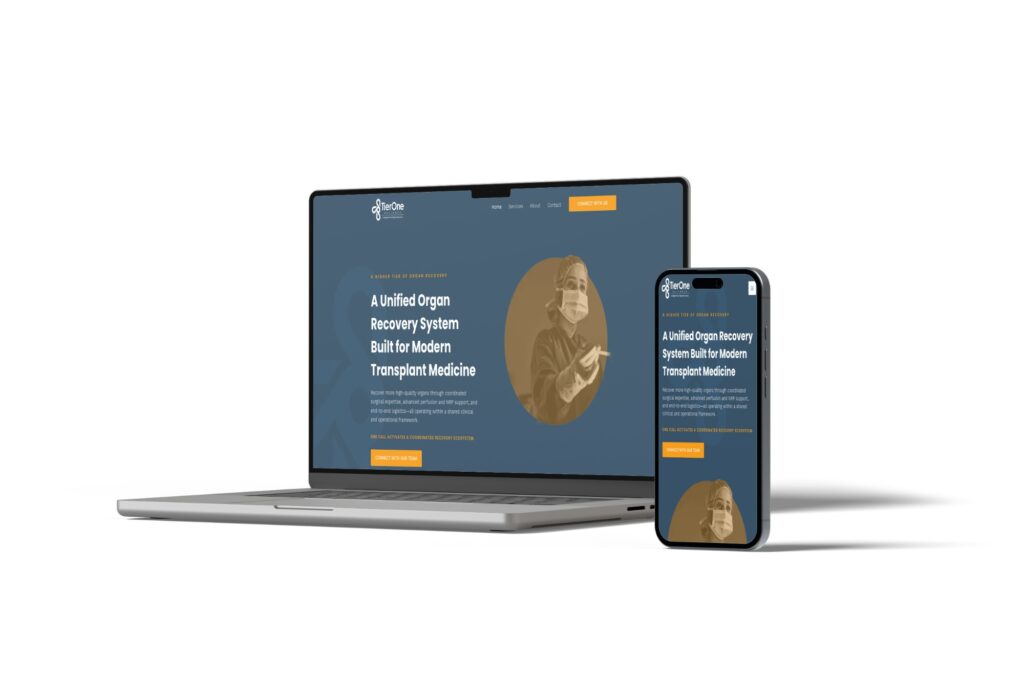
Organizations that sell to hospitals, like staffing or clinical services companies, need a different shape. Their buyers are administrators and department heads, so the site leans on capabilities, coverage areas, and proof. When we built a site for a new organ recovery alliance formed by three companies, the job was turning a highly technical service into one simple promise: one call activates everything.
How We Approach Healthcare Website Design
Here’s the process we use with health clients. Borrow any of it.
Start with a conversation about patients and rules. We ask who your patients are, how they find you today, and what rules you work under: HIPAA, ethics codes, accreditation requirements, legal review. That last question gets skipped too often.
See a prototype first. We design your homepage, a services page, and your contact page before the full build. You approve the direction before we build the rest. For one provider, that’s where anonymous testimonials earned their prominent spot.
Sort the content. Health organizations often have years of pages, PDFs, and announcements. When we redesigned a county health department’s site, the biggest job was sorting and reorganizing a large amount of content so residents could find what they came for.
Build and launch in phases. A site with online booking and payments typically launches about six weeks after kickoff. Larger builds can take four to six months. We can build on your final domain and keep it hidden from search engines until launch.
Host, maintain, and measure. After launch we host and maintain the site, keep tracking off sensitive pages, and report on what matters: calls, appointment requests, and where new patients come from.
On cost, our published numbers apply: a new small business site averages around $3,500, a redesign runs $2,500 to $8,000 depending on what the site needs to do, and care plans average $150 to $750 a month. You can see more on our WordPress web design page.
One Thing You Can Do This Week
Open your website on your phone and pretend you’re a new patient. It’s the quickest healthcare website design audit there is.
- Time how long it takes to find your phone number and a way to request an appointment. More than five seconds is too long.
- Find out whether you take a specific insurance plan. If you can’t tell from the site, neither can your patients.
- Look at every form on the site. If any asks about symptoms, conditions, or insurance, find out where those submissions are stored and who can read them.
- Ask ChatGPT and Google to recommend a provider like you in your city. Note whether you’re named.
Fix the first three before you worry about the fourth.
What should a healthcare website include?
At minimum: a phone number and appointment request on every page, one page per service or condition, insurance information, location pages with hours and directions, provider bios, privacy-safe forms, a new-patient page, a careers section, and a privacy policy and accessibility statement. Multi-location groups need a page for each location.
Does a healthcare website need to be HIPAA compliant?
The website itself isn’t “HIPAA certified,” but any part of it that collects, stores, or sends protected health information has to be handled under HIPAA if you’re a covered entity. In practice, that means using a form service that signs a business associate agreement for intake forms, keeping health details out of email, and keeping analytics and ad pixels off sensitive pages. Google says it doesn’t offer business associate agreements for Google Analytics.
How long does it take to build a healthcare website?
A site with online booking and payments typically launches about six weeks after kickoff at our shop. Larger builds with many locations, extensive content, or integrations can take four to six months. Getting content, photos, and compliance answers early is the biggest factor in staying on schedule.
Do healthcare websites have to meet ADA or WCAG standards?
Many do. Organizations that receive federal health funding fall under an HHS Section 504 rule that adopts WCAG 2.1 Level AA for websites and apps, and HHS extended its compliance dates by a year in 2026. Even if the rule doesn’t apply to you, building to WCAG 2.1 AA makes your site usable for more patients. Check your specific obligations with your compliance officer or attorney.
How much does healthcare website design cost?
Our published pricing: a new small business site averages around $3,500, and a redesign runs $2,500 to $8,000 depending on what the site needs to do. Healthcare sites with secure intake forms, several locations, or integrations land higher.
Get a Second Opinion on Your Healthcare Website
Healthcare website design comes down to three things: help patients find the right care fast, protect their information, and earn their trust before the first call. Most practices are closer than they think. A few fixes to forms, tracking, and service pages can make a real difference.
If you want a second set of eyes, request a free website and conversion review. We’ll look at how patients move through your site, flag forms and tracking that could create risk, and show you what to fix first. Request your website review or call us at (859) 951-8412.