Most small business owners judge a website by three things: whether it brings in calls, whether they can change the hours without paying someone, and whether it will still work in three years. That’s the right way to judge WordPress for small business use, and it’s how we’ll judge it here.
We build on WordPress, so you know where we stand. We also host and maintain the sites we build, which means we see the upkeep side every week: the plugin updates, the failed installs, the sites other people abandoned. This guide gives you both halves. You’ll get the real advantages, the real drawbacks, who should pick something simpler, and a checklist for running a WordPress site the right way if you go that route.
Table of Contents
Is WordPress Good for Small Business?
Yes, for most small businesses whose website has a job to do. If your site needs to rank in local search, take bookings, collect forms, list jobs, sell products, or grow from five pages to fifty, WordPress handles all of it, and you own the result outright.
The condition is maintenance. WordPress is software, and software needs updates. A WordPress site that someone looks after is one of the most flexible tools a small business can own. A WordPress site nobody touches for two years turns into a security risk and a slow, broken mess.
So the short answer has two parts. WordPress is a strong choice when the website matters to your sales and someone is responsible for keeping it healthy. It’s the wrong choice when you want a simple online brochure and never want to think about upkeep. The rest of this guide walks through the pros and cons of WordPress for small business owners, so you can decide which side of that line you’re on.
What WordPress Actually Is
WordPress is free, open-source software for building and running websites. You install it on hosting you choose, add a theme for the design, and add plugins for features. WordPress.org calls itself the platform of choice for millions of websites, “from creators and small businesses to enterprises.”
There are two versions with confusingly similar names. WordPress.org is the free software you install on your own hosting. WordPress.com is a hosted service run by a separate company that works more like a website builder. When a web designer says “WordPress,” they almost always mean the self-hosted version, and that’s what this article covers.
Because the software is free, your costs come from everything around it: hosting, a domain, the design and build, any premium plugins, and someone’s time to maintain it. If you’re weighing WordPress against an all-in-one builder, we compared the two models side by side in WordPress vs Squarespace for small business. This article sticks to WordPress itself: what it does well for a small business, and where it costs you.
The Pros of WordPress for Small Business
Here’s what WordPress for small business sites does well, starting with the advantage owners tend to underestimate.
1. You Own the Website
This is the biggest advantage of WordPress for small business owners, and the one they notice only when something goes wrong. WordPress is licensed under the GPL, and the WordPress.org license page spells out your freedom to run the software for any purpose and change it to do what you need. Your site’s files and database belong to you. You can move to a different host, hire a different developer, or bring the work in-house, and you take the whole site with you.
Ownership only counts if your business holds the keys. This fall we’re helping a business that can’t reach the company that built and hosts its WordPress site. The business controls its domain names, but not the hosting account or the WordPress admin login. Copying the public pages wouldn’t bring the theme, the settings, or the database behind them, so if that provider stays silent, the realistic fix is a rebuild. Put your own name and email on the hosting account, the domain, and an administrator login, and give every vendor a separate account you can remove.
2. It Grows With the Business
A small business website rarely stays the same size. You add a service, open a second location, start hiring, or decide to take payments online. WordPress handles each of those as an addition to the site you already have, so growth doesn’t mean starting over on a new platform.
Beyond Behavior ABA and Learning Center is a good example. They provide clinic-based and in-home ABA therapy across multiple locations and had no website before we built one. The site reassures parents first, then gets practical with services, facilities, and careers for therapists. Next, we’re moving their onboarding paperwork online.
3. Plugins Handle Real Business Tasks
The official WordPress plugin directory lists over 77,000 free plugins, and independent developers sell thousands more. That covers the work small businesses actually need a website to do: contact and quote forms, online booking, payments, liability waivers, job applications, email signups, event calendars, and online stores through WooCommerce. When no plugin fits, a developer can build exactly what you need.
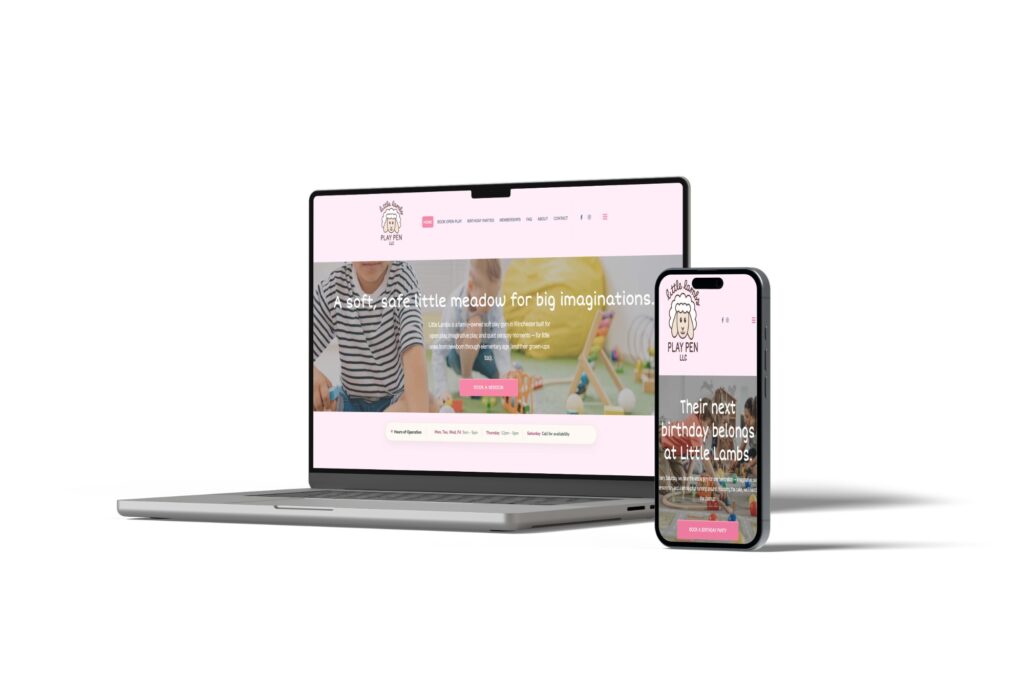
Little Lambs Play Pen, a family-owned soft play gym in Winchester, shows what that looks like day to day. We moved their forms and liability waivers online, which took the business paperless and keeps the front desk moving. Booking for open play, Saturday birthday parties, and memberships sits right up front on the homepage.
There’s a catch we’ll come back to in the cons. Every plugin is code someone has to keep updated. The plugin library is a strength when you choose a handful of well-supported plugins and a weakness when a site collects dozens nobody remembers installing.
4. Strong Control Over SEO
WordPress gives you full control over the parts of a page Google reads. Google’s own SEO Starter Guide says there are no secrets that will automatically rank your site first, and that a content management system can handle basics like page titles and sitemaps. WordPress does those basics, and an SEO plugin such as Rank Math or Yoast adds the rest: custom titles and descriptions for every page, structured data, FAQ markup, redirects when a page moves, and control over what Google indexes.
That matters most for local businesses competing on searches like “landscaper near me” or “pediatric therapy in Lexington.” You can build a page for each service and each town you serve, write the content you need, and fix technical issues without waiting on a platform to add a setting. Every site we build includes on-page SEO basics: speed, image sizes, titles, and meta descriptions. The platform makes that work easier, but the content and effort still decide where you rank. If local search is your main goal, our local SEO guide for small businesses covers what to do next.
5. Your Team Can Update It
A well-built WordPress site lets your staff change the things that change most: text, photos, hours, staff bios, a holiday banner, a new job posting. You don’t need to call a developer to swap a photo.
WordPress also controls who can do what. It has six pre-defined user roles, from Administrator down to Subscriber, so your office manager can edit pages while a part-time helper can only draft blog posts. When we hand over a site, we coach anyone on the client’s team who needs to make changes, including a new hire a year after launch.
Some businesses take that further. An equipment company we’re talking with this fall wants to update its own pricing, descriptions, and lead times across hundreds of products. One option we proposed: we build the store’s framework and first product categories, and their team enters the rest. WordPress makes that kind of split realistic.
6. Design Without a Template Ceiling
On WordPress, the design can be anything your business needs. A designer can build custom layouts, separate paths for different customers, and mobile features that match how your customers actually use their phones. You aren’t limited to whatever a template allows.
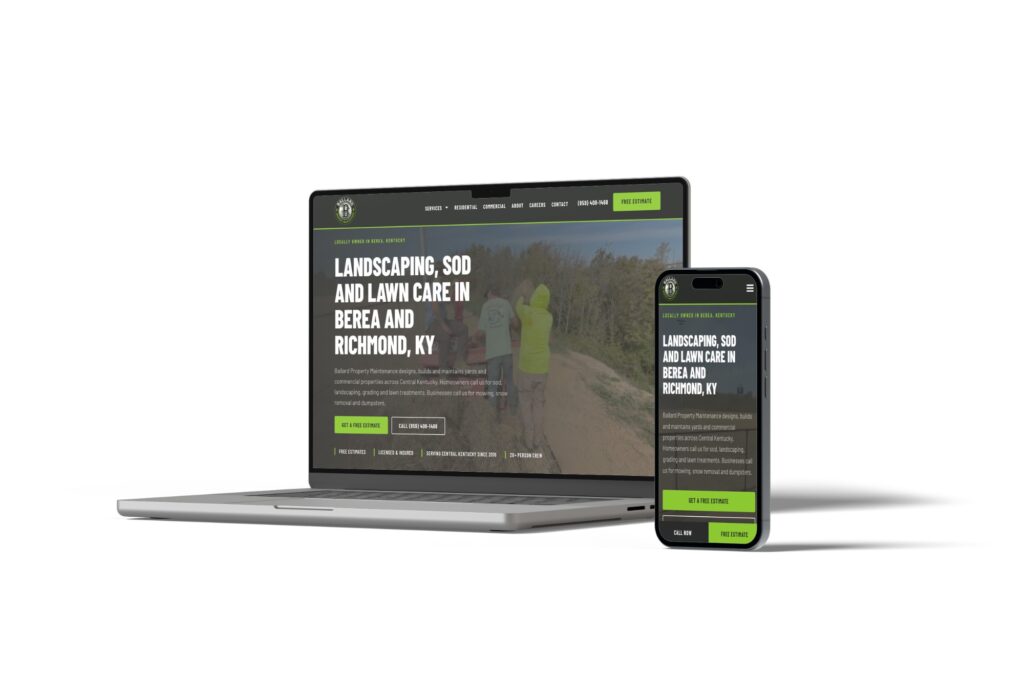
Ballard Property Maintenance had no online presence when they came to us. We built their first website so a Berea landscaping crew looks as established online as it is on the job, which matters when bidding commercial work. Residential and commercial services each get their own path, and a call and free-estimate bar stays pinned to the bottom of the screen on phones.
7. You’re Never Stuck With One Vendor
Because WordPress is so widely used, plenty of developers, designers, and hosting companies know it. If your web partner retires, raises prices, or stops answering the phone, someone else can pick up your site and keep going. That’s a real safety net for a small business that can’t afford to rebuild every time a relationship ends.
The Cons of WordPress for Small Business
Every platform has trade-offs. These are the ones that come up most often with WordPress for small business sites, starting with the biggest.
1. It Needs Ongoing Maintenance
This is the drawback that matters most. WordPress core, your theme, and every plugin release updates on their own schedules. The WordPress security page says only the latest version of WordPress is officially supported, with fixes sent to older versions only as a courtesy. Skip updates long enough and your site falls behind on security fixes, then one day an update fails because too much changed at once.
We see this on calls. This summer we helped an owner who manages their own WordPress site on budget shared hosting. The WordPress core update had failed, a premium page builder license had lapsed and had to be repurchased before it would update, and the caching plugin and several others needed attention. Each fix was small. Together they took a few hours the owner hadn’t planned on, and that kind of work piles up quietly until something breaks.
You have two choices here. Do the updates yourself on a schedule, or pay someone to do them. Our website care plan guide explains what a good plan covers and what to expect to pay.
2. Security Is Your Responsibility
Hosted builders handle security behind the scenes. With WordPress, it falls to you, your host, or your developer. WordPress’s hardening guide lists outdated plugins and software among the common ways attackers get in, and it advises getting plugins and themes only from the WordPress.org directory or well-known companies.
The common thread in that guidance is upkeep. The fix is a routine: updates, a firewall, strong logins, and backups you can restore quickly. Updates themselves sometimes break things, which is why a backup taken right before each update matters as much as the nightly one.
3. The Costs Are Spread Out
The software is free, but WordPress for small business use still has costs. A small business on WordPress pays for hosting, a domain, the design and build, any premium plugins or licenses, and maintenance. Those costs come from different places at different times, so they’re easy to underestimate.
For a sense of scale, here’s what we’ve published. A website redesign with us runs “Anywhere from $2,500 to $8,000 depending on what you need the website to do for you.” For hosting and maintenance together, “Our average plan costs between $150-$750 a month.” A brand-new small business site: would average around $3,500 to build. Whatever you’re quoted, add up three years of hosting, plugins, and upkeep alongside the build price so you’re comparing real totals.
4. Setup Has a Learning Curve
Getting WordPress running yourself means choosing hosting, installing the software, picking a theme, adding plugins for forms, SEO, and security, and connecting your domain. None of those steps are hard alone. Together, they take time a busy owner rarely has, and mistakes made in the first week (a bloated theme, a cheap host, a missing backup) can follow the site for years.
5. Too Many Plugins Slow It Down
WordPress speed depends on hosting, the theme, and how many plugins the site loads. Most plugins add code that loads on some or all of your pages. Google explains how it measures loading and responsiveness in its Web Vitals guide, and slow mobile pages lose visitors before they see your offer.
The server matters too. WordPress recommends PHP 8.3 or greater, and notes that older versions such as PHP 7.4 have reached End of Life and may expose a site to security vulnerabilities. We’ve cleaned up sites still running old PHP with a long list of plugins, and trimming both is one of the first things we do to speed a site up.
6. Quality Depends on Who Builds It
Because anyone can build a WordPress site, quality ranges from excellent to awful. A rushed build on a heavy theme with a stack of plugins can be slower and harder to edit than a basic builder site. Before you hire anyone, look at sites they’ve launched on a phone, ask who hosts and maintains them, and ask what happens if you part ways.
Who Should Skip WordPress
WordPress isn’t the right fit for every business. A simpler, all-in-one builder may serve you better if:
- You’re a solo business that needs a simple, attractive site this month, and you’ll build and update it yourself.
- The site mostly describes what you do and collects contact requests, and you don’t expect that to change.
- Nobody will own updates and backups, and there’s no budget to pay someone for it.
- You want one company to handle software, hosting, and support under one bill, even if that means less control.
There’s no shame in starting simple. Just know that if you outgrow a builder later, moving usually means rebuilding the site. If you can already see that growth coming, it often costs less to start on the platform you’ll grow into.
Who WordPress Fits Best
WordPress for small business use pays off when:
- The website is a lead source, and you plan to invest in SEO, content, or ads.
- You need booking, payments, waivers, job applications, a store, or connections to other software.
- You serve several towns, run more than one location, or offer services that each deserve their own page.
- More than one person will update the site, with different levels of access.
- You want to own the site outright and keep the freedom to change hosts or developers.
- You have a developer, a hosting partner, or a staff member who will handle maintenance.
If most of these describe your business, WordPress is very likely the better long-term choice.
A Checklist for Running WordPress for Small Business
If you choose WordPress, these habits keep it fast, secure, and useful. Use this list whether you manage the site yourself or hire someone.
- Own every account. Your business holds the domain, the hosting account, an administrator login, and your Google accounts. Vendors get their own logins.
- Update on a schedule. Core, theme, and plugins, at least monthly, with security fixes applied sooner.
- Test updates on a staging site first. A staging site is a private copy of your website. Problems show up there instead of in front of customers.
- Back up every night and before every update. Keep several weeks of restore points, stored somewhere other than the website’s own server, and test a restore once in a while. WordPress’s backup guide covers the basics.
- Keep the plugin list short. Remove anything you don’t use. Install only from the WordPress.org directory or established developers.
- Keep PHP current. Ask your host which version your site runs, and plan an upgrade if it’s past End of Life.
- Test your forms. A contact form that quietly fails can cost you leads for weeks before anyone notices.
- Watch for downtime. Use a monitor that alerts someone when the site goes down.
- Name one person responsible. “Someone will handle it” is how sites go two years without an update.
On the sites we host, our WordPress hosting covers most of this list: nightly backups plus one before every update, more than 30 restore points, staging sites, Cloudflare and a hardened firewall, and US-based support by phone, text, or email.
Is WordPress good for small business?
Yes, for most small businesses whose website needs to bring in leads, take bookings, or grow over time. WordPress gives you full ownership, thousands of plugins for business tasks, and strong SEO control. It needs regular maintenance, so it works best when you or a partner will keep it updated and backed up.
Is WordPress free for a small business?
The WordPress software is free to download and use. Running a business website on it still costs money: hosting, a domain, the design and build, any premium plugins, and ongoing maintenance. Compare the three-year total, including upkeep, against any builder subscription.
Is WordPress secure enough for a small business website?
Yes, when it’s maintained. WordPress’s own hardening guide lists outdated plugins and software among the common ways attackers get in. Keep everything updated, use trusted plugins, run a firewall, and keep nightly backups you can restore quickly.
Can I update my WordPress website myself?
Yes. A well-built WordPress site lets you or your staff edit text, photos, hours, and blog posts without touching code. WordPress user roles let you decide who can edit, publish, or only draft. Complex features and technical maintenance are usually best left to a developer.
Should a small business use WordPress.com or WordPress.org?
Most businesses that hire a web designer use the self-hosted software from WordPress.org, because it gives full control over design, plugins, and hosting. WordPress.com is a hosted service that handles more for you, with more limits depending on the plan. If you want custom features and full ownership, self-hosted WordPress is the usual choice.
Get WordPress Without the Upkeep
WordPress for small business use comes down to one trade. You get ownership, flexibility, and room to grow, and in return someone has to take care of it. If you’re ready to make that trade and would rather not do the upkeep yourself, that’s what we do.
Our team in Lexington designs custom WordPress websites for small businesses across Kentucky and beyond, then hosts and maintains them so updates, backups, and security never land on your desk. You work directly with the people building your site. See how our WordPress web design works or call us at (859) 951-8412.