WordPress itself is free. The website built on it is a different story. A WordPress website cost for a small business comes down to eight things: your domain, hosting, a theme, plugins, the design and build, content, ongoing care, and marketing. Some of those cost almost nothing. One of them makes up most of the bill. If you’ve asked three people what a site should cost and gotten three very different answers, the gap almost always sits in the build and in what each quote quietly leaves out.
This guide walks through each cost, line by line, so you can budget for every piece and compare quotes fairly. We design, build, and host custom WordPress sites from our office in Lexington, Kentucky, so the examples come from projects we quote and build. Everything here is useful whether you hire us, hire someone else, or build the site yourself.
Table of Contents
How Much Does a WordPress Website Cost? The Short Answer
The range is wide because “a WordPress website” covers everything from a five-page site you set up yourself on a weekend to a store with 500 products and a custom quote cart.
Here’s how the money usually splits:
- One-time costs: design, development, content, and setup. This is the big number on a proposal.
- Yearly costs: your domain renewal and any premium theme or plugin licenses.
- Monthly costs: hosting and maintenance, plus SEO or advertising if you invest in them.
For a new small business site built by our team, pricing is on average $3,500. For a redesign of an existing site, the range is “Anywhere from $2,500 to $8,000 depending on what you need the website to do for you.” Hosting and maintenance run on top of that. For our website care plans, “Our average plan costs between $150-$750 a month.”
Those numbers only mean something once you know what goes into them. The rest of this guide breaks that down.
WordPress.org vs. WordPress.com: Why the Prices Don’t Match
When people ask “how much does a WordPress website cost?”, part of the confusion comes from two products sharing one name.
WordPress.org is the free, open source software. You download it at no charge, install it on hosting you choose, and own everything. WordPress.org describes that path as being for anyone comfortable getting their own hosting and domain. The software is licensed under the GPL, which gives you the freedom to run it for any purpose, change it, and share it. Nobody can send you a bill for using WordPress.
WordPress.com is a hosting company that runs WordPress for you on paid plans. It’s a convenient way to start a simple site, and its pricing page is what many people find first when they search. Those plan prices cover hosting and features on that service. Custom design and a professional build cost extra.
When an agency or freelancer quotes a “WordPress website,” they almost always mean the self-hosted version from WordPress.org. That’s what we build, and it’s what the rest of this guide covers.
The 8 Costs That Make Up a WordPress Website Cost
Think of a website like a building. The land, the permits, the materials, and the contractor all show up on different bills. Here’s each line item and what drives it up or down.
1. Domain Name
Your domain is your address: yourbusiness.com. You register it through a domain registrar and renew it every year. For a standard .com, this is one of the smallest costs on the list. Premium or already-owned domains can cost far more if you have to buy one from its current owner.
Two things matter more than price. First, register the domain in your own name, on an account you control. We meet business owners whose domain was registered by a past designer or an old employee, and getting it back can take weeks. Second, consider buying close variations of your name. When we set up a new site, we often send owners a few domain options to buy so a competitor can’t grab a similar address.
2. Hosting
Hosting is the server space where your site lives. It’s an ongoing monthly or yearly cost, and it has the widest quality gap of anything on this list.
Shared hosting puts your site on a server with many others. It’s the cheapest option and fine for a hobby site. Speed and security depend on your neighbors, and support is usually a help desk queue.
Managed WordPress hosting is tuned for WordPress and typically adds backups, security, caching, and support. It costs more and saves you from most of the problems cheap hosting creates.
Whatever you pick, check that it meets WordPress’s own server recommendations, which currently call for PHP 8.3 or greater and MySQL 8.0 or MariaDB 10.11 or greater. Read the renewal price as well as the first-term price, and ask how often the host backs up your site and how fast it can restore one.
Hosting also affects search. Google’s guidance on page experience favors sites that load quickly and work well for visitors. A slow host can drag down an otherwise good site. Our WordPress hosting includes nightly backups, a backup before every update, 30+ restore points, Cloudflare, and a hardened firewall.
3. Theme
The theme controls how your site looks. You have three options.
Free themes. WordPress.org lists over 15,000 free themes. Many are well built. The trade-off is that other sites may look a lot like yours, and you’re limited to what the theme allows.
Premium themes. Commercial theme shops sell themes with support and updates. WordPress.org notes that the GPL doesn’t require everything to be zero-cost, so these companies charge for support, membership, or extra features. Expect a one-time purchase or a yearly license.
Custom design. A designer creates the look from scratch around your brand, often using a page builder or a lean starter theme underneath. This costs the most and gives you a site shaped around your business instead of around a template.
4. Plugins and Licenses
Plugins add features: contact forms, booking, SEO tools, security, caching, galleries, payments. WordPress.org hosts over 77,000 free plugins, so many needs cost nothing.
Premium plugins are where small costs add up. Page builders, advanced form tools, and booking systems often come as paid licenses that renew every year. If a license lapses, you stop getting updates, and an outdated plugin is a security risk. WordPress’s own hardening guide warns that older versions don’t get security fixes.
On our projects, the theme and plugin licenses a site needs belong to the owner, and we list them in the proposal before any work starts. That way you know what renews, when, and in whose name. Ask any designer for the same list.
5. Design and Development
This is the largest part of any WordPress website cost, and the one that varies most. You’re paying for planning, design, building, testing, and launch. What drives the price:
- Number of unique page layouts. Ten service pages that share one layout cost less than ten pages that each need their own design.
- Custom features. Online booking, payments, waivers and online forms, member logins, a quote cart, or calculators each add design, build, and testing time.
- E-commerce. A store with 20 products is a different project from one with 500 products and many variations.
- Integrations. Connecting the site to your CRM, scheduling software, payment processor, or email platform takes setup and testing.
- Content migration. Moving years of pages, posts, and images from an old site takes real hours.
- Speed and SEO groundwork. Every site we build includes on-page SEO: speed, image sizes, titles, and meta descriptions.
A brochure site with a contact form sits at the low end. A site that books appointments and takes payments sits higher. A site that has to sell online, manage hundreds of products, and connect to other systems sits at the top.
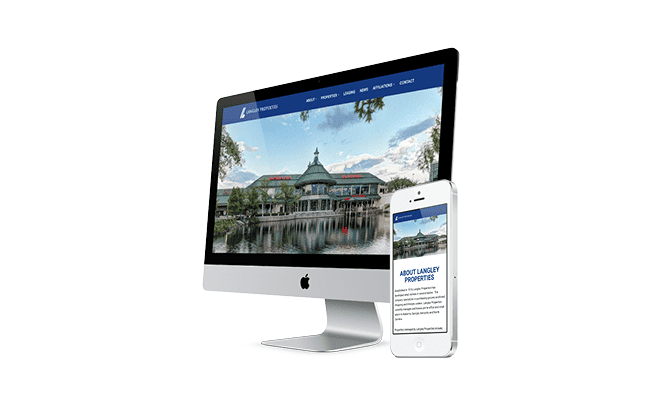
When we redesigned the Langley Properties site, the scope included listings of available properties, a news section, and a contact form for potential tenants and investors. Each of those features shows up as its own piece of the work, and each one affects the price.
6. Content: Copy, Photos, and Data Entry
Content is the part of a WordPress website cost people forget. Somebody has to write every page, gather photos, and load products or listings.
You can write the copy yourself, which saves money and costs you time. You can hire a copywriter, which costs more and usually produces pages that convert better. Photography works the same way. Stock photos are cheap and generic. A half-day with a local photographer gives you real images of your team, your shop, and your work.
Data entry is the big one for stores and listing sites. On a recent e-commerce quote, we wrote two proposals: a full build where we load every product, and a hybrid where we build the framework and first product categories, then hand the rest to the client’s team. The hybrid costs less. The full build saves the client’s staff weeks of work, and this client leaned toward it because their old product descriptions needed rewriting anyway. Either can be the right call, as long as you choose on purpose.
7. Maintenance and Care
A website needs ongoing updates, backups, security, and small fixes after launch. WordPress, your theme, and your plugins all release updates on their own schedules, and someone has to apply and test them.
Our website care plans bundle hosting, maintenance, and support. “Our average plan costs between $150-$750 a month.” Where your site lands depends on its complexity, how much support you need, and whether it runs a store, bookings, or auctions. We covered what a good plan includes, and what to ask before you sign up, in Website Care Plans Explained.
8. SEO and Marketing
A new site with good on-page SEO gives Google what it needs to understand your pages. Ranking for competitive searches takes ongoing work: new content, local listings, reviews, and links from other sites. That’s a separate monthly service from the build.
For a local business, “$400–$500 a month minimum is a good starting point for local SEO.” Paid ads are another option and run on whatever budget you set. Neither is required to launch, but plan for at least one if the site’s job is to bring in new customers.
WordPress Website Cost by Type of Site
Most small business sites fall into one of these groups. Use them to find where your project sits.
| Type of site | What drives the cost | Typical scope |
|---|---|---|
| Brochure or informational site | Number of pages, custom design, copywriting | Home, about, services, contact, and a few service pages |
| Lead generation site | Separate service and location pages, forms, call tracking | More pages, each built to rank for one service |
| Booking or payment site | Scheduling, payment setup, confirmation emails, testing | About six weeks from the deposit on a recent build |
| E-commerce store | Product count, variations, shipping, taxes, payment gateway | WooCommerce, which is free at its core with free and paid extensions |
| Redesign of an existing site | Content migration, redirects, new features | “Anywhere from $2,500 to $8,000 depending on what you need the website to do for you.” |
For a new brochure, lead generation, booking, or e-commerce build from our team, pricing is going to be higher than a standard webiste. You are looking at in excess of $4,000 or $5,000. We recently built an e-commerce site that sold a single product for $6,000.
If you’re planning a redesign, our website redesign checklist covers the 20 steps that protect your rankings and content during the move.

DIY vs. Freelancer vs. Agency
There are three common ways to get a WordPress site built. Each one moves the WordPress website cost to a different place.
Do it yourself. Your cash cost is the domain, hosting, a theme, and any premium plugins. Your real cost is time: learning WordPress, building pages, writing copy, and keeping it all updated. This works for a side business or a very simple site. It gets expensive when your hourly value is high or the site has to bring in leads.
Freelancer. A good freelancer can build a solid site for less than most agencies. Ask who handles updates, backups, and emergencies after launch, and what happens if they take a full-time job or stop answering email. Many freelancers build on a premium theme, which keeps costs down and limits how custom the site can get.
Agency. You pay more upfront for design, strategy, project management, and a team that stays around after launch. A good agency also handles the parts that break sites later: hosting, backups, security, and updates. Ask what’s included after launch before you compare totals.
Whichever route you choose, you should own the domain, the hosting account or a full copy of the site, and every license. We’ve met owners stuck on a template site from a vendor they can’t leave without starting over.
How We Price a WordPress Website at TVD
Here’s how a project works with us, so you can see where each part of your WordPress website cost goes.
We start with a conversation about what the site has to do. Pages and features come from that. A site that needs to book appointments gets quoted differently from one that only needs to make the phone ring.
A deposit starts a prototype. Before we build every page, we design and build a few key pages, usually the homepage, a services page, and the contact page. You see the direction on a working site and approve it before the full build. Nobody spends money on 30 pages in the wrong style.
Licenses are listed upfront. Any premium theme or plugin the site needs is in the proposal, in your name, at its actual cost.
Options when they help. When a project could go two ways, like loading every product ourselves or splitting data entry with your team, we price both so you can choose.
On-page SEO is part of the build. Speed, image sizes, titles, and meta descriptions are done before launch. Ongoing SEO is a separate, optional service.
We launch in phases. Getting the core site live sooner lets you start collecting leads while we add the next round of pages or features.
Our clients range from local service companies to national manufacturers. Ballard Property Maintenance had no online presence before we built their site. Larger projects with hundreds of products follow the same process at a bigger scope.
Hidden Costs That Surprise Business Owners
These are the parts of a WordPress website cost that show up after launch, when nobody planned for them:
- License renewals. Premium plugins and themes that renew every year. If nobody tracks them, they lapse, and updates stop.
- Hosting renewal rates. Some hosting plans advertise a first-term price that goes up at renewal. Check both.
- Payment processing fees. If you sell online, your payment processor takes a fee on each sale.
- Business email. Email at your own domain is often a separate monthly cost.
- Fixing a broken site. A failed update with no recent backup can turn a free afternoon into an emergency bill.
- Lost leads. A contact form that quietly stops sending can cost more than any line item here. We’ve talked with owners whose forms were down for months before anyone noticed.
- Starting over. A site you don’t own, or one built on a closed platform, often has to be rebuilt when you leave.
Ask about each one before you sign, and most of them never become a problem.
10 Questions to Ask Before You Accept a Quote
Use these to compare any WordPress website quote, including ours:
- What’s included in the price, page by page and feature by feature?
- How many rounds of design changes are included?
- Do I see a prototype before you build the full site?
- Which premium themes or plugins will the site use, and what do they renew at?
- Who writes the content and supplies the photos?
- Is on-page SEO included? What does it cover?
- Who registers the domain, and is it in my name?
- Where will the site be hosted, and who maintains it after launch?
- What’s the timeline, and what could delay it?
- If I leave, do I get a full copy of the site and every license?
A clear answer to every question is a good sign. A vague answer to question 10 is the biggest red flag on the list.
How to Keep Your WordPress Website Cost Down
You can spend less without ending up with a site that doesn’t work:
- Launch with the pages you need now. Add the rest in a second phase once the site is bringing in leads.
- Write your own first draft of the copy. Even rough notes save a copywriter hours.
- Reuse layouts. Service pages that share one design cost less to build.
- Share data entry. For stores and listing sites, your team can load products after we build the framework.
- Choose plugins carefully. Fewer, better plugins mean fewer licenses, fewer conflicts, and a faster site.
- Plan maintenance from day one. A care plan costs less than rescuing a neglected site.
The cheapest site is the one you only have to build once. A site that brings in calls pays for itself. One that sits there costs you every month you keep it.
How much does a WordPress website cost for a small business?
WordPress itself is free. A small business site costs the domain, hosting, any premium theme or plugin licenses, and the design and build, which is the largest share. For a new build from our team, pricing is starting at around $3,500. Redesigns run “Anywhere from $2,500 to $8,000 depending on what you need the website to do for you.”
Is WordPress really free?
Yes. The WordPress software from WordPress.org is free and open source under the GPL. You pay for the things around it: a domain, hosting, premium themes or plugins if you want them, and the time or the team to build the site.
How much does it cost to maintain a WordPress website?
It depends on who does the work and how complex the site is. Doing it yourself costs your time plus hosting and licenses. A professional plan bundles hosting, updates, backups, security, and support. For our website care plans, “Our average plan costs between $150-$750 a month.”
How much does it cost to host a WordPress website?
Hosting ranges from low-cost shared plans to managed WordPress hosting that adds backups, security, and support. The cheapest plans rarely include the backups and monitoring a business site needs. Compare what’s included and the renewal price as well as the first-term price.
Why do WordPress website quotes vary so much?
Quotes cover different work. One may include custom design, copywriting, SEO setup, and a prototype. Another may be a premium theme with your logo dropped in. Ask each provider to break the quote into design, development, content, licenses, and ongoing costs so you can compare line by line.
Get a Clear Quote for Your WordPress Website
If you’re working out the WordPress website cost for a new site or a redesign, we’ll tell you what it needs, what it doesn’t, and what each piece costs before any work starts. You’ll see a prototype of your key pages before we build the rest.
See how our WordPress web design works, or call us at (859) 951-8412 to talk it through with our Lexington team.